
Anthropic recently published a technical guide with an unassuming title: Best Practices for Computer and Browser Use with Claude.
On the surface, it reads like an engineering handbook — how to set screenshot resolution, where to place cache breakpoints, whether to pick Sonnet or Opus. But read the whole thing and you’ll find that the most informative parts aren’t about how to do things. They’re about why these things need to be done at all. Behind every best practice is an engineering problem that hasn’t been fully solved.
The demos already look impressive — AI can see screens, move cursors, fill forms, navigate between pages. But between “it works” and “it’s reliable,” there’s an engineering gap. This post pulls out the two most important threads from the guide — context management and Teaching Mode — and examines the capability boundaries each one reveals.
1. It falls apart on long runs
Here’s a basic fact. Computer Use works as a loop: screenshot → model thinks → outputs coordinate or action → system executes → takes another screenshot → repeat.
This loop has a hard constraint. Each screenshot consumes 1,000 to 1,800 tokens. Claude’s context window is 200k tokens. Do the math: with one screenshot per step, you hit the ceiling after roughly 100 steps.
A hundred steps sounds like a lot. But for real automation tasks — say, processing 20 tickets in an ERP system, each requiring 5–8 steps — you burn through 100 steps fast.
Anthropic’s guide presents a three-layer solution. Notably, this isn’t a clean architectural design. It’s more like patches stacked on patches.
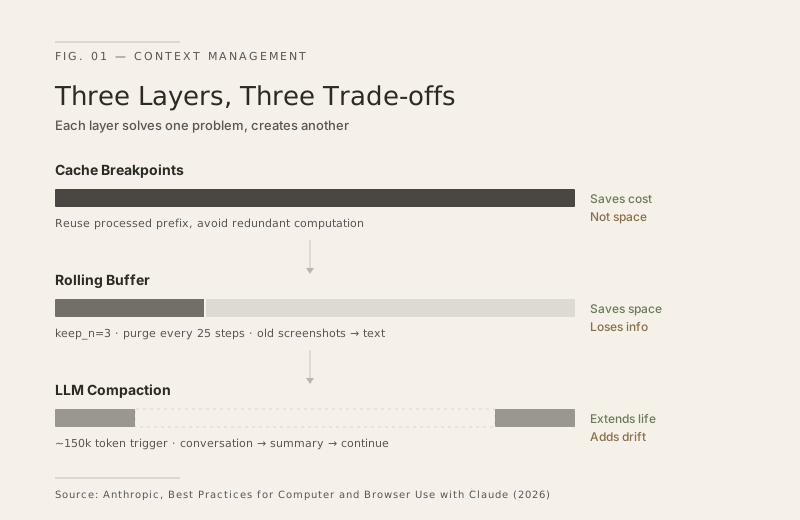
Layer 1: Cache breakpoints. Place cache markers on the system prompt and recent tool call results, letting the API reuse previously processed prefixes. This layer addresses cost — avoiding redundant computation — but doesn’t address space. The window still fills up.
Layer 2: Rolling buffer. Keep only the 3 most recent screenshots (keep_n=3), replacing older ones with plain text descriptions. Purge every 25 steps. This layer solves the space problem, but at the cost of irreversible information loss — the model no longer remembers what earlier screens actually looked like. It only has text summaries.
Layer 3: LLM compaction. When input approaches 150k tokens, call another model to compress the entire conversation into a structured summary, then continue working on the compacted context. The guide even provides a template for the compaction prompt, requiring preservation of the original user instructions, completed actions, errors encountered, current state, and next steps.
Stack all three layers together and you see a clear chain of trade-offs:
- Caching saves money, but not space
- Rolling buffer saves space, but loses information
- LLM compaction extends the session, but every compression introduces drift — the model’s memory of early actions becomes “someone else’s summary,” and the longer the task, the greater the drift
The candor of this approach is striking. Anthropic isn’t pretending the problem is solved. Their default configuration — keep_n=3, purge every 25 steps, trigger compaction at 150k — reads more like empirical tuning than theoretical optimum. The guide even mentions that if a cache breakpoint fails after compaction, the system should “gracefully degrade.”
This is an engineering-level “good enough” solution, not a fundamental one. The context window is a physical constraint of the current Transformer architecture. Until there’s an architectural breakthrough — like truly reliable external memory systems — long-task reliability will hit a definite ceiling. The three-layer approach raises that ceiling considerably, but it’s still there.
2. Screen recording beats prompt writing
Even with context management sorted out, you still face a second problem: how do you tell the AI what to do?
The most common approach today is writing prompts — describing the steps in natural language: “Click the menu in the top left, then select ‘New Project,’ enter a name in the field…” Anyone who’s used Computer Use knows how fragile this is. A slight change in UI layout can invalidate position descriptions. Too vague and the model clicks the wrong thing; too detailed and you’ve basically written pseudocode — might as well write a script.
Anthropic’s guide introduces a different approach: Teaching Mode, or demonstration mode.
The idea is intuitive — a human performs the task once on screen while the system records each step’s screenshot, click coordinates, CSS selectors, and action descriptions. Once recorded, this “operation recording” is fed to the model as context. The model doesn’t blindly replay; it uses the recording as reference while adapting to the current UI state.
The guide defines three playback modes:
- Strict: Follow recorded steps exactly. If the UI has changed too much, report the anomaly rather than improvising.
- Adaptive: Treat the recording as a reference, adjusting when layouts change. If a menu moved from the sidebar to the top bar, the model should find it on its own. Recommended as default.
- Goal-oriented: Focus only on the end result. Steps serve as hints, nothing more. Maximum model autonomy.
This sounds a lot like RPA — and it is, but with one crucial difference.
Traditional RPA records deterministic scripts: click coordinates (342, 518), wait 2 seconds, type text. One UI redesign — a button moves, a new popup appears — and the script breaks instantly. RPA maintenance costs are notorious; many enterprises spend more time maintaining recorded scripts than creating them.
Teaching Mode doesn’t record scripts. It records “intent references.” The model sees “this step clicks the ‘New Project’ button,” not “click coordinates (342, 518).” If the button moves, the model can find it on its own — provided its visual understanding is strong enough.
This is a direction shift worth noting. It lowers the barrier for “teaching AI to do things” from “writing code” to “recording your screen.” For non-developers, this may be the actual prerequisite for Computer Use becoming usable.
But the limitations are clear too. You need recording infrastructure — Anthropic provides a data model in their reference implementation, but production-grade recording tools aren’t mature yet. Recording quality directly affects playback quality. The demonstration library needs maintenance — if the target application undergoes a major redesign, recordings need to be re-done. These costs don’t disappear; they shift from “maintaining scripts” to “maintaining recordings.” The progress is real, but it’s not magic.
3. Where are we on the ladder?
Back to the question from the beginning.
The demo phase — AI can operate a computer — is behind us. The model’s visual comprehension and coordinate output capabilities are sufficient for most single-step operations. The extensive discussion of resolution optimization and click accuracy in the guide actually demonstrates that these problems have entered the range of solvable engineering.
The engineering phase — making AI reliably operate a computer — is in progress. The three-layer context management approach is an honest engineering answer, but the problems it exposes matter more than the problems it solves.
The scaling phase — enabling non-developers to define and reuse automation tasks — Teaching Mode points the direction, but maturity is still a ways off.
If you want to use Computer Use for something right now, a pragmatic framework:
- Ready to deploy: Tasks under 20 steps, high tolerance for errors (reversible actions), human oversight (not fully unattended).
- Still needs time: Long unattended workflows, irreversible operations (deletions, payments, sends), complex multi-application coordination.
Anthropic’s choice to publish this engineering guide before the technology is fully mature is telling. It usually means two things: enough developers are using Computer Use in production that common problems need a unified answer, and enough of those problems have been observed to warrant one.
The distance from “it works” to “it’s reliable” — Anthropic knows better than anyone. This guide is the evidence.